
Dear Tim,
Today I’ve been doing the work behind authentication. I tell you, the idea of confirming that a user is who you think it is, ensuring that a user’s data is protected, and giving them the secure options to reset their password, confirm it’s them and even to register is… it’s a lot! You think the idea of a button that says ‘Login’ is easy is a huge underestimation on the complicatedness that comes from security. So let’s review what exactly I’ve done.
I decided, rather than manage the user data within my data DB, I’d use Amazon’s Cognito service to separate them out – I’m not interested in trying to marry the concepts into one database, or have to secure my data when most of it is fictional anyway. I could probably have made another database, but why when AWS’ authentication services will provide me security and all I have to do is hook my website into its APIs? It just makes sense to build upon the ready-done work.
But that lends into the challenge of incorporating a new library into my React code, and that includes looking up guides, of which I’ve perused:
https://github.com/mubbashir10/aws-cognito-react-auth
https://github.com/aws-amplify/amplify-js/tree/master/packages/amazon-cognito-identity-js
https://docs.amplify.aws/lib/auth/start/q/platform/js/#configure-your-application
https://reactrouter.com/docs/en/v6
Kudos to all those above because they’ve almost given me an understanding of what’s going on. I’ve done a heavy amount of editing and understanding – I’m not one to steal code, I usually take a project (such mubbashir10) and then read it to understand how it’s done, test it, copy and paste parts, and then do the classic Year 9 essay of modifying words to make it mine (although more sophisticated than that obviously – I’ve renamed components to remain consistent with my own code, switched from Typescript to Javascript, changed how variables are stored, taken out the util functions as I’ll probably build my own interface, rejiggled the whole form, removed references to material-ui as I’m not using it, and so on…). And now I’ve ended up in the classic position of saving, looking at the errors, fixing, saving, looking at the errors, fixing, and so on, like a REAL developer.
At least it feels like progress.
To those who know how authentication works, it’s all about token-based authentication nowadays. You register by giving a bunch of details, which are encrypted and stored as hashes in a database. You login by providing those same details to compare against your saved details, and it gives you a time-associated ‘token’ that you use like a ticket. Then rather than resending your details each time, you just tell the website this is your ticket and if they have a record of that ticket being valid, they let you do your business. Easy! Logging out, you just invalidate your ticket. Double easy. But things get complicated as sometimes you need to change your registered details, like your password. And if you’ve forgotten it, you need it reset, but still need to prove it’s you, so you have email verification. Which effectively is just proving you know at least ONE account password somewhere.
It’s a big responsibility, usernames and passwords. Even though I am determined to only store fake data – I have no interest in real, useable user details – the fact I have an email and a password is enough to mean I need to really protect it, because of the common knowledge that people often use the same password EVERYWHERE. So because human beings are limited in memory compared to a computer and don’t have access to easy-to-use password management software, the responsibility is on me to ensure that I don’t accidentally leak those emails and passwords. Which is why I’m determined to stick to AWS so I can limit that responsibility. Hopefully Cognito doesn’t get hacked.
You might notice I didn’t say human’s are stupid – look it’s easy to say that someone using the same password for multiple sites is stupid. Really, the truth is I have about a hundred separate accounts across a variety of sites, some of which I used rarely or barely. There are methods for creating easy to remember and complicated passwords, but even that got me in a position of having to reset my account passwords multiple times! That’s why society is moving towards multi-factor authentication right? Because that’s more reliable than human memory. Hell, it was easier when we had physical keys because then it was a physical object you could run around with.
Maybe we should consider using USB keys in future. Plug in a USB password drive and it stores your passwords. It could turn a memory problem into just holding onto a physical object like the old days.
I digress, so for my website I need at least five things:
- I need to be able to ‘Register as a citizen’ – the initial data storage.
- I need to be able to ‘Login as an existing citizen’ – the retrieval of such details
- I need to provide a means to ‘Reset a forgotten password’ – else I’ll be hit with new accounts being spawned over and over again
- I therefore need to provide ‘Email verification’ so that passwords can be reset.
- And finally, I need to be able to ‘Authenticate a user for their details page’ – so they can access a specific user page where they can modify their user details after logging in and, the big thing…
- Vote. I need my citizens to vote. This’ll be an annoyance because I have to hook AWS API Gateway into Cognito, but because they’re both AWS they should be capable. That’s another reason to using Cognito, I can link these two technologies with relative ease.
Because then I have these important facets:
- A citizen can only vote in the constituency they’re registered in
- They can only vote once for one candidate (at the moment… Alternative Vote Systems to be considered)
- They cannot vote on behalf of another user
- They can only vote once in each election, but therefore must be able to vote in multiple elections
I already have an idea on how to prevent voting too many times while still being able to vote in elections – database unique keys help here, as well as keeping a boolean that registers having voted, that ONLY gets wiped by my backend systems. The ‘behalf of other users’ is where the whole authentication system comes in.
Part of me is concerned I’m using React now because these systems are all going to be visible in the javascript and therefore should be user-level protected. I’ve looked at Next.js that seems to pride itself on server-side rendering which may be useful in future, but for now to get this task done, I’m sticking to what I’ve got.
I originally had part of these systems set up in a modal, but that turned out to be too much of a taxation on my mind, managing which components render and passing variables between one another. It’s now just turned to routes.
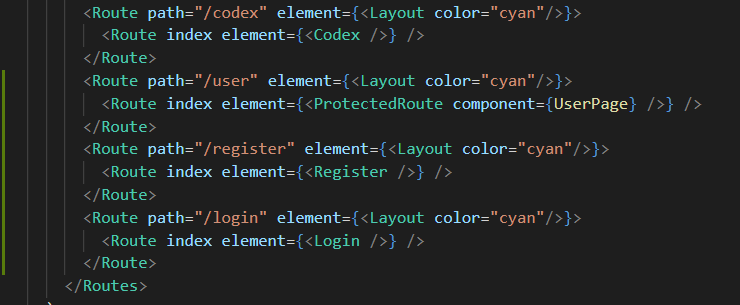
The trouble is I’m not even sure how much of the code I can show without it become a security risk. I’m guessing not a lot as it will be viewable in the JS code anyway but still, can’t be too careful.
It’s hard to reconcile my too secure and lax on security sides of thinking. I want to trust everyone. I also don’t want to trust anyone. And so we fall into a very strange middle-ground.
I suppose it’s similar to your own situation, eh Tim? I forget you had the very same issues when you were in Chile last year. Ended up being a bite in the butt when you were trapped in the crate of bananas. At least I know this won’t be a worldwide sensation and so I don’t need to worry too much about it – I’m not a global conglomerate. And my life is also not dependant on it like yours was. Anyway, I hope this gives you a reprieve in these tumultuous times. I’ll be sure to let you know if I can get it to authenticate a user securely.
Yours,
Stan

 WoodenSocks